Are we ready for Netsuite Next?
•
2026-10-28
•
5 mins

This week I had the privilege of attending SuiteWorld. It was in most ways one of the most exciting conferences I’ve attended. If you haven’t been living under a rock, you’ve heard about AI, how it’s going to help us all be more efficient, and have probably been trying to operationalize it in your business for the last couple of years.
This year Oracle introduced Netsuite Next. Netsuite next is an AI-first user interface for Netsuite which integrates both AI chats, chatting with your ERP, and agentic capabilities. The offering itself was very compelling and had a depth of vision, and it’s clear Oracle spent a lot of time getting this right.
However, it has some less obvious potential gotchas that I hope Oracle will solve in upcoming releases.
What I love about it?
Governance
Netsuite Next, like Netsuite AI Connector Service uses your users’ roles. That means by default it will not show users something that they could not otherwise see, or perform actions that they otherwise could not. Similarly, each agent you create and run in the context of its human owners’ roles subject to human approval for actions.
The governance vision, and approval workflows are quite impressive in Netsuite next.
The new draft record capability that drives many of the approval workflows, and exception-related work is very well thought out, and in my opinion should be easy to use for your users.
Aware of your environment
Netsuite Next is aware of your custom fields, custom records, your custom forms, etc. When you invoke an action through Netsuite next, your workflows still apply.
Customizable skills and tools
Netsuite next uses industry standard markdown to create skills.
Citations
By default all information that Ask Oracle and Netsuite next expose contains citations. You can click in to see where it came from, any why it did a particular thing. This means that it’s way easier to spot hallucinations if they occur.
Ease of use
Between Agent Studio, AI portlets, and Ask Oracle, all of those things are very easy to use. Way easier than what you might expect for the level of automation that’s possible. I can definitely see my normal users being able to use AI Portlets and ask Oracle, and my power users being able to use Agent Studio.
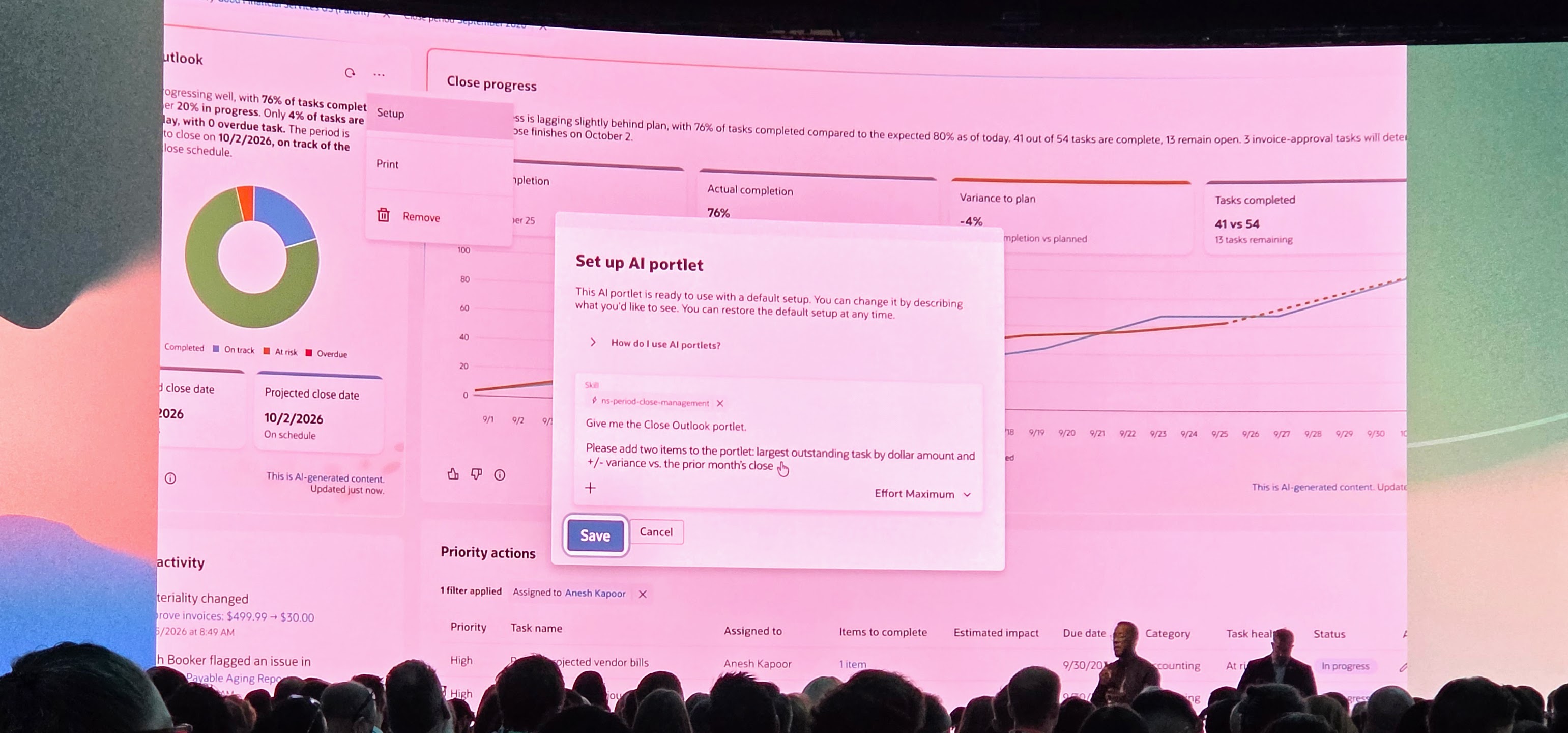
It really is that easy to create your own portlets. You just type a prompt in plain english, and Netsuite Next does the rest to create a visualization for you.
Concerns/Potential Gotchas
Sources of data
As it stands right now Netsuite Next can only use data in netsuite itself, or provided as additional context via manual uploads. This is a serious drawback for a variety of reasons.
During the show I had the opportunity to speak to several other Netsuite customers about where they do their analytics and how. I didn’t talk to anyone who exclusively uses SuiteAnalytics for their business analytics. Instead, most people use external datawarehouses with ETL pipelines to unify several sources of data. Many enterprises have separate product information management platforms (PIM), Digital Asset Management (DAMs), web analytics (If they’re in ecommerce like I am), third party CRM (Not every Netsuite customer uses Netsuite CRM), ad performance data, among others. In our case we use Snowflake for our Enterprise Data Warehouse, and extract and load data from several sources into it.
Although I’ve heard indications that Netsuite Next will eventually be able to connect to external MCP servers (Potentially within the next couple of months, but you know, Oracle safeharbor statements apply, so we don’t know for sure), at the moment that isn’t a feature… So any external data will need to be supplied as an additional upload.
Context
Currently context can be provided either from data stored in your Netsuite file cabinet, documents uploaded alongside your prompts, or in custom skills. However, again, most other customers I spoke to do not store all of their business process context in the Netsuite file cabinet. Although you can get around this by adding additional skills, it’s still something to be aware of, and it means injecting and updating context is less automated than it could be.
For example, you could augment your enterprise AI solution with context on business processes and policies through a RAG (Retrieval Augmented Generation) service that indexes relevant documents, and lets the AI look up what it needs to know without spending tons of tokens injecting the context for each request.
Although obviously not a representative sampling of Netsuite customers, many customers I talked to store their documentation in Sharepoint, Confluence, or somewhere else other than the file cabinet because the file cabinet is not really designed as a place that you can collaboratively edit documents.
Controls on Credit usage
Like every AI solution, token usage dictates the cost to use the platform. Each customer gets a token quota, which is shared among all of the users with access to Netsuite AI features (Through Netsuite Next and Ask Oracle). However, you cannot set credit usage limits per user or per role at this time.
So should you use it?
In my opinion, yes. However, I don’t think it’s in a place where you should roll it out to all of the users in your company, or use it for every task, especially in environments where the data in Netsuite is not sufficient on its own for your needs. And fortunately, Oracle knows that, you can determine which roles get access to Netsuite Next and Ask Oracle.
I found several usecases compelling for our usecases, specifically automating close, AI Portlets, anomoly analysis to name a few. Its reporting capabilities are impressive, but if you choose to use it for that of course the caveat about third party data sources applies.
I also suspect based on having talked to several Oracle employees at SuiteWorld that it will continue to improve in ways that address some of these shortcomings. I don’t think it’s at a place (Yet) where it can be the only company AI you deploy.
Like it? Share it!